 xixiNote
Git Download
Download for Windows
在git官网下载
快速安装
这里演示的是快速安装
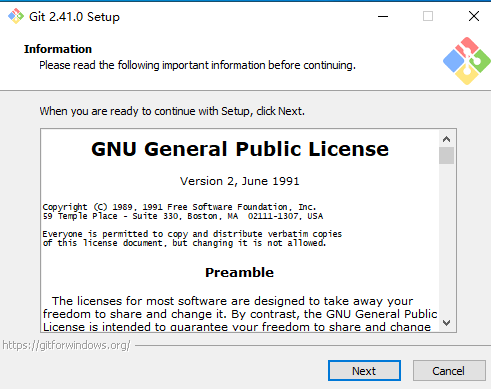
路径自行选择,这里选择默认路径
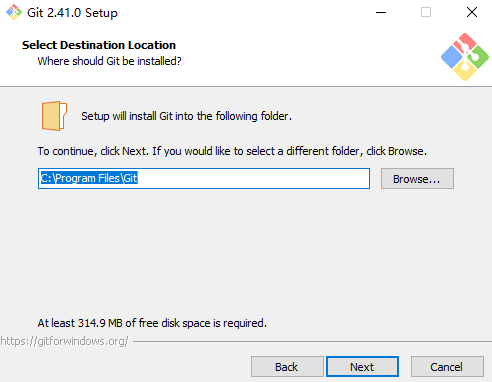
默认勾选,这里红色框起来的必须选,不然后期使用很麻烦
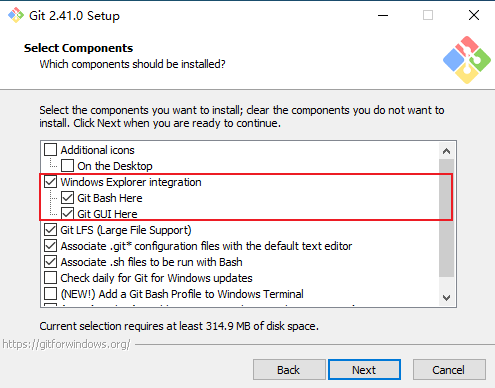
接下来一直next
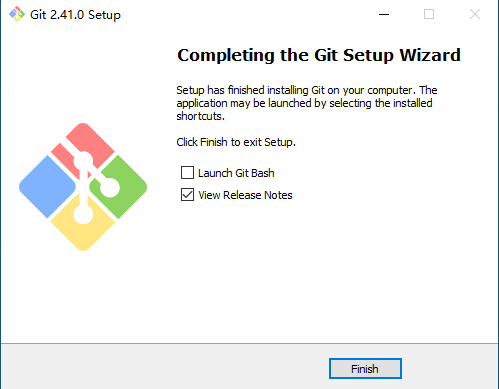
安装完成
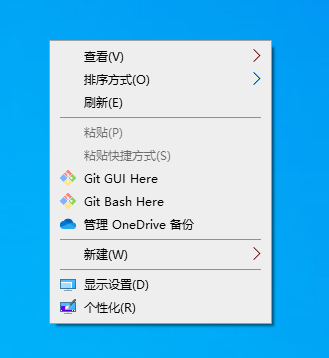
我们使用它只需要在任意窗口右键即可在下拉菜单中看到git
TIP
Git GUI:Git提供的图形界面工具 Git Bash:Git提供的命令行工具
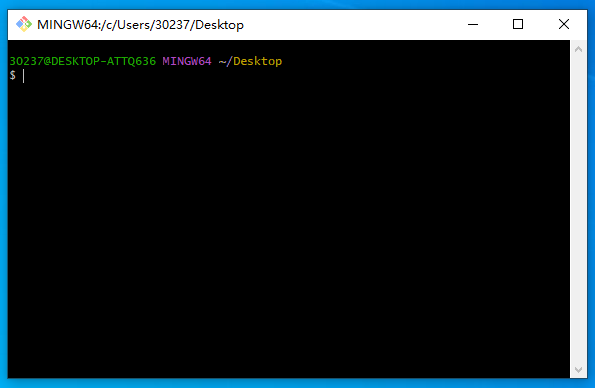
接下来我们便可以在bash中使用git命令了
明细安装
这里演示的是详细安装
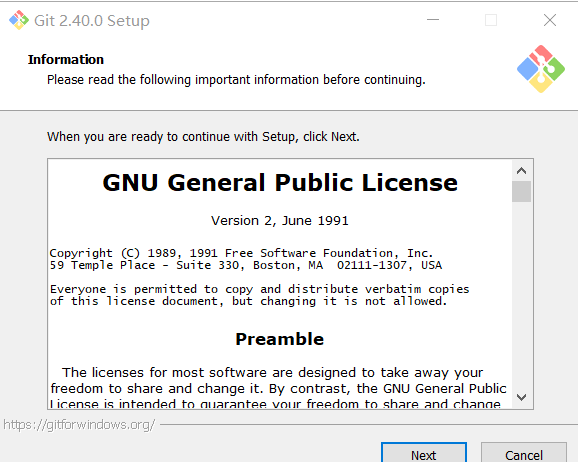
Information
使用许可声明
双击下载后的 Git-2.40.0-64-bit.exe,开始安装,这个界面主要展示了 GPL 第 2 版协议1的内容,点击 [next] 到第二步。
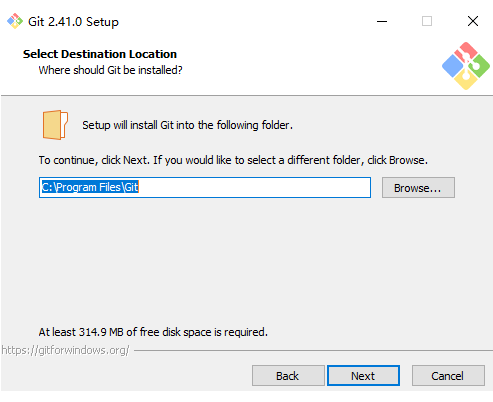
Select Destination Location
选择安装目录
可点击 “Browse…” 更换目录,也可直接在方框里面改,我一般直接默认不修改。点击 [next] 到第三步。
Select Components
选择组件
大家根据自己的需要选择勾选。
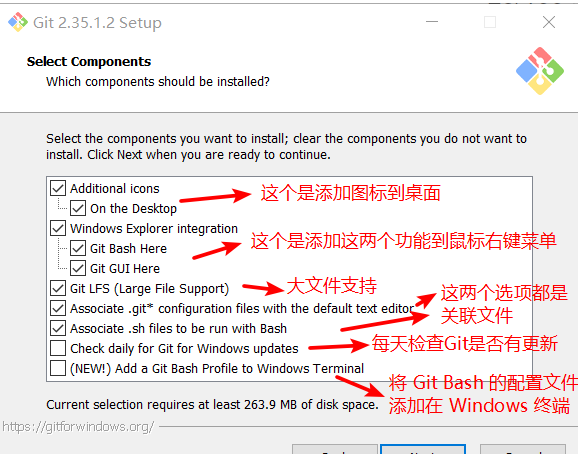
最后一个选项打勾的话,需要下载 Windows Terminal 配合 Git Bash使用
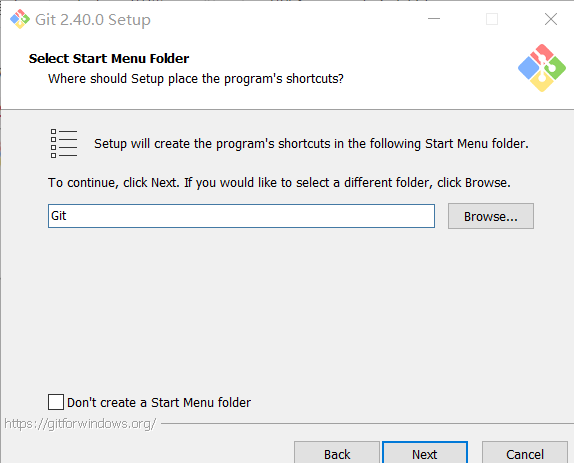
Select Start Menu Folder
选择开始菜单文件夹
方框内 Git 可改为其他名字,也可点击 “Browse...” 选择其他文件夹或者给"Don't create a Start Menu folder" 打勾不要文件夹,点击 [next] 到第五步。
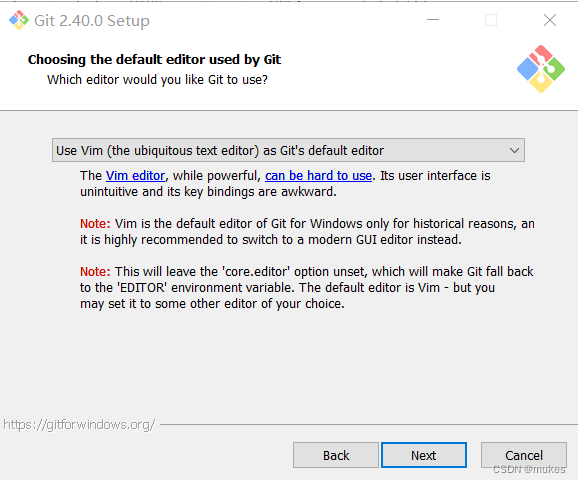
Choosing the default editor used by Git
选择 Git 默认编辑器
Git 安装程序里面内置了 10 种编辑器供你挑选,默认的是 Vim ,选择 Vim 后可以直接进行到下一步,但是 Vim 是纯命令行,操作有点难度,需要学习。如果选其他编辑器,则还需要去其官网安装后才能进行下一步,有Linux基础的默认就行
如果你不想用 Vim 当默认编辑器,换一个,比如 Notepad++ ,那么你者需要点击下面的蓝色字体 " Notepad++ " 去其官网下载安装好才能进行下一步 [next].
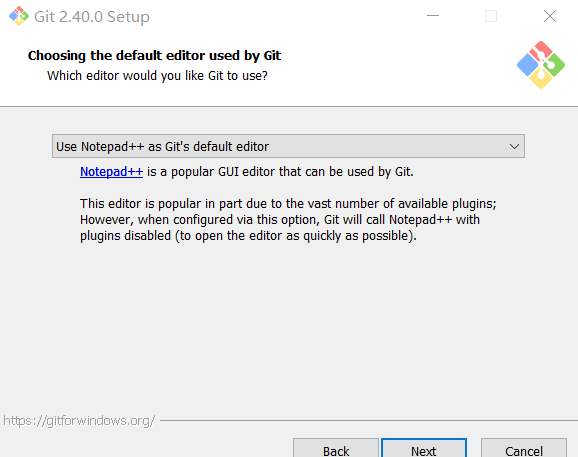
安装后还要配置在我的电脑->属性->高级系统设置->高级->环境变量->系统变量->Path->编辑添加 Notepad++ 的安装地址,如 C:\Program Files\notepad++. 这样才能在 Git Bash 里面直接调用 Notepad++.
notepad++ 文件名.后缀notepad++ 文件名.后缀新手建议使用 Sublime Text或者notepad++
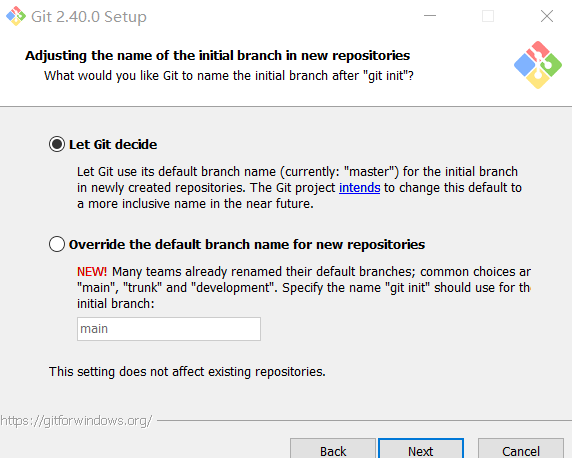
Adjusting the name of the initial branch in new repositories
决定初始化仓库名字
第一个是让 Git 自己选择,名字是 master ,但是未来也有可能会改为其他名字;第二种是我们自行决定,默认是 main,当然,你也可以改为其他的名字。一般默认第一种。
TIP
通常gitee创建仓库默认的是master,github创建仓库默认的是main,也可以直接略过,后期能自行修改
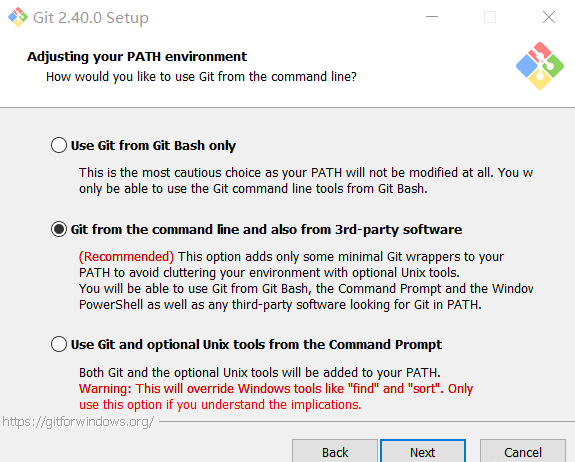
Adjusting your PATH environment
调整你的 path 环境变量
翻译
Use Git from Git Bash only
This is the most cautious choice as your PATH will not be modified at all. You w only be able to use the Git command line tools from Git Bash.
仅从 Git Bash 使用 Git 这是最谨慎的选择,因为您的 PATH 根本不会被修改。您将只能使用 Git Bash 中的 Git 命令行工具。
翻译
Git from the command line and also from 3rd-party software
(Recommended) This option adds only some minimal Git wrappers to your PATH to avoid cluttering your environment with optional Unix tools.
You will be able to use Git from Git Bash, the Command Prompt and the Windov PowerShell as well as any third-party software looking for Git in PATH.
从命令行以及第三方软件进行 Git(推荐)
此选项仅将一些最小的 Git 包装器添加到PATH中,以避免使用可选的 Unix 工具使环境混乱。 您将能够使用 Git Bash 中的 Git,命令提示符和 Windov PowerShell 以及在 PATH 中寻找 Git 的任何第三方软件。
翻译
Use Git and optional Unix tools from the Command Prompt Both
Git and the optional Unix tools will be added to your PATH.
Warning: This will override Windows tools like "find"and "sort". Only use this option if you understand the implications.
使用命令提示符中的 Git 和可选的 Unix 工具Git 和可选的 Unix 工具都将添加到您的 PATH 中。
警告:这将覆盖 Windows 工具,例如 "find" and "sort". 仅在了解其含义后使用此选项。
第一种是仅从 Git Bash 使用 Git。这个的意思就是你只能通过 Git 安装后的 Git Bash 来使用 Git ,其他的什么命令提示符啊等第三方软件都不行。
第二种是从命令行以及第三方软件进行 Git。这个就是在第一种基础上进行第三方支持,你将能够从 Git Bash,命令提示符(cmd) 和 Windows PowerShell 以及可以从 Windows 系统环境变量中寻找 Git 的任何第三方软件中使用 Git。推荐
第三种是从命令提示符使用 Git 和可选的 Unix 工具。选择这种将覆盖 Windows 工具,如 “ find 和 sort ”。只有在了解其含义后才使用此选项。一句话,适合比较懂的人折腾。
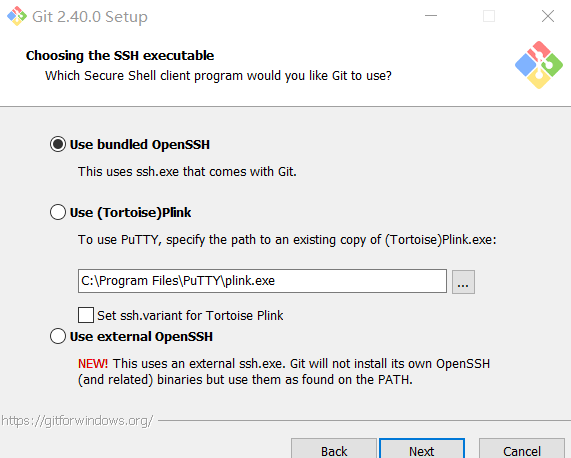
Choosing the SSH executable
选择 SSH 执行文件
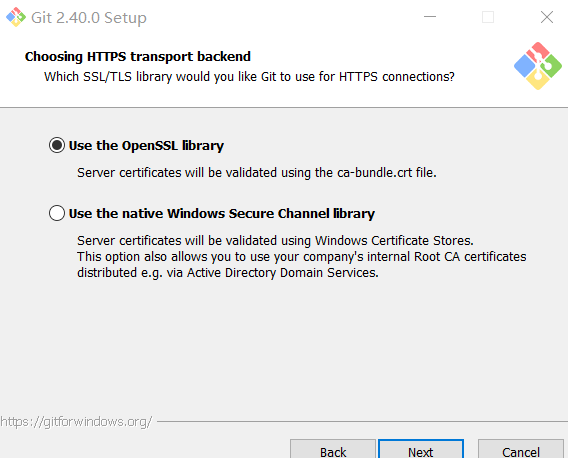
Choosing HTTPS transport backend
选择HTTPS后端传输
默认选择第一种
翻译
Use the OpenSSL library
Server certificates will be validated using the ca-bundle. crt file.
使用 OpenSSL 库
服务器证书将使用 ca-bundle.crt 文件进行验证。
Use the native Windows Secure Channel library
Server certificates will be validated using Windows Certificate Stores.
This option also allows you to use your company's internal Root CA certificates distributed e.g. via Active Directory Domain Services.
使用本机 Windows 安全通道库
服务器证书将使用 Windows 证书存储进行验证。
此选项还允许您使用公司内部分发的内部根 CA 证书,例如通过 Active Directory 域服务。
Configuring the line ending conversions
配置行尾符号转换
默认选择第一种,详情请自行了解
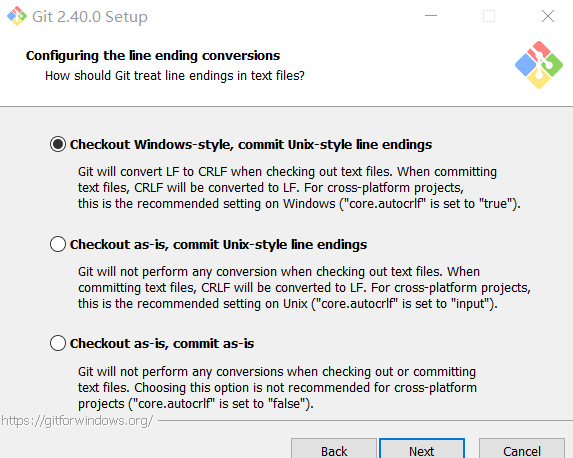
这三种选择分别是:
签出 Windows 样式,提交 Unix 样式的行结尾。
按原样签出,提交Unix样式的行结尾。
按原样签出,按原样提交。
Configuring the terminal emulator to use with Git Bash
配置终端模拟器以与 Git Bash 一起使用
默认选择第一种
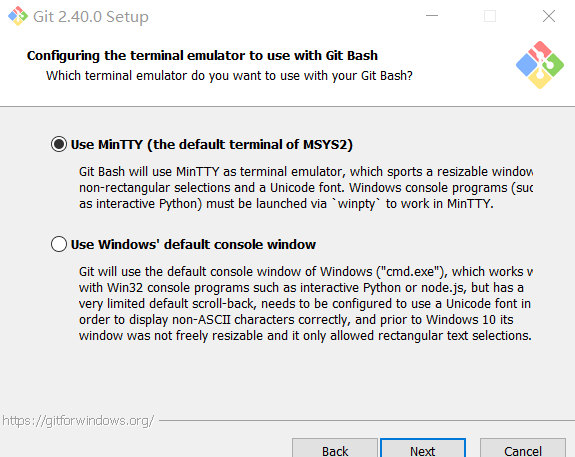
翻译
Use MinTTY(the default terminal of MSYS2)
Git Bash will use MinTTY as terminal emulator, which sports a resizable window non-rectangular selections and a Unicode font.Windows console programs(such as interactive Python) must be launched via 'winpty' to work in MinTTY.
使用 MinTTY(MSYS2的默认终端)
Git Bash 将使用 MinTTY 作为终端仿真器,该仿真器具有可调整大小的窗口非矩形选择和 Unicode 字体。
Windows 控制台程序(例如交互式 Python)必须通过 "winpty" 启动才能在 MinTTY 中运行。
Use Windows' default console
window Git will use the default console window of Windows("cmd.exe"), which works v with Win32 console programs such as interactive Python or node. js, but has a very limited default scroll-back,needs to be configured to use a Unicode font in order to display non-ASCII characters correctly, and prior to Windows 10 its window was not freely resizable and it only allowed rectangular text selections.
使用 Windows 的默认控制台窗口
Git 将使用 Windows 的默认控制台窗口("cmd.exe"),该窗口可与 Win32 控制台程序(例如交互式Python 或node.js)一起使用,但默认回滚非常有限,需要将其配置为使用 Unicode 字体才能正确显示ASCII 字符,并且在Windows 10 之前,其窗口不可随意调整大小,并且仅允许选择矩形文本。
建议选择第一种,MinTTY 3功能比 cmd 多,cmd 只不过 比 MinTTY 更适合处理 Windows 的一些接口问题,这个对 Git 用处不大,除此之外 Windows 的默认控制台窗口(cmd)有很多劣势,比如 cmd 具有非常有限的默认历史记录回滚堆栈和糟糕的字体编码等等。 相比之下,MinTTY 具有可调整大小的窗口和其他有用的可配置选项,可以通过右键单击的工具栏来打开它们 git-bash.
Download for Linux and Unix
在linux和unix下载
It is easiest to install Git on Linux using the preferred package manager of your Linux distribution. If you prefer to build from source, you can find tarballs on kernel.org. The latest version is 2.42.1.
使用Linux发行版的首选包管理器在Linux上安装Git是最简单的。如果您喜欢从源代码构建,可以在on kernel.org上找到tarball。最新版本为2.42.1。
CentOS
yum install -y gityum install -y gitDebian/Ubuntu
For the latest stable version for your release of Debian/Ubuntu
为您的Debian/Ubuntu发行的最新稳定版本
apt-get install gitapt-get install gitFor Ubuntu, this PPA provides the latest stable upstream Git version
对于Ubuntu,这个PPA提供了最新稳定的上游Git版本
add-apt-repository ppa:git-core/ppa` `# apt update; apt install gitadd-apt-repository ppa:git-core/ppa` `# apt update; apt install gitFedora
yum install git # up to Fedora 21yum install git # up to Fedora 21dnf install git # Fedora 22 and laterdnf install git # Fedora 22 and laterGentoo
emerge --ask --verbose dev-vcs/gitemerge --ask --verbose dev-vcs/gitArch Linux
pacman -S gitpacman -S gitopenSUSE
zypper install gitzypper install gitMageia
urpmi giturpmi gitNix/NixOS
nix-env -i gitnix-env -i gitFreeBSD
pkg install gitpkg install gitSolaris 9/10/11 (OpenCSW)
pkgutil -i gitpkgutil -i gitSolaris 11 Express
pkg install developer/versioning/gitpkg install developer/versioning/gitOpenBSD
pkg_add gitpkg_add gitAlpine
apk add gitapk add gitRed Hat Enterprise Linux, Oracle Linux, CentOS, Scientific Linux, et al
RHEL and derivatives typically ship older versions of git. You can download a tarball and build from source, or use a 3rd-party repository such as the IUS Community Project to obtain a more recent version of git.
Red Hat Enterprise Linux及其衍生产品通常附带旧版本的git。您可以下载tarball并从源代码构建,或者使用第三方存储库,如IUS Community Project来获取最新版本的git。
Slitaz
tazpkg get-install gittazpkg get-install git